Every enterprise has the same problem: enormous amounts of knowledge locked in documents. Policy manuals. Technical runbooks. Contract repositories. HR guides. Compliance frameworks. Thousands of files that nobody has time to read, and even less time to search through when they actually need something.
The traditional answer was enterprise search. The modern answer is a knowledge-enhanced AI agent. And in Azure AI Foundry, the way you build that is called Foundry IQ.
What Is Foundry IQ?
Foundry IQ is the knowledge retrieval layer of Azure AI Foundry. It lets your agent answer questions grounded in your specific documents – not just the LLM’s training data.
The underlying pattern is called Retrieval-Augmented Generation (RAG). You’ve probably seen this term. Here’s what it actually means in practice
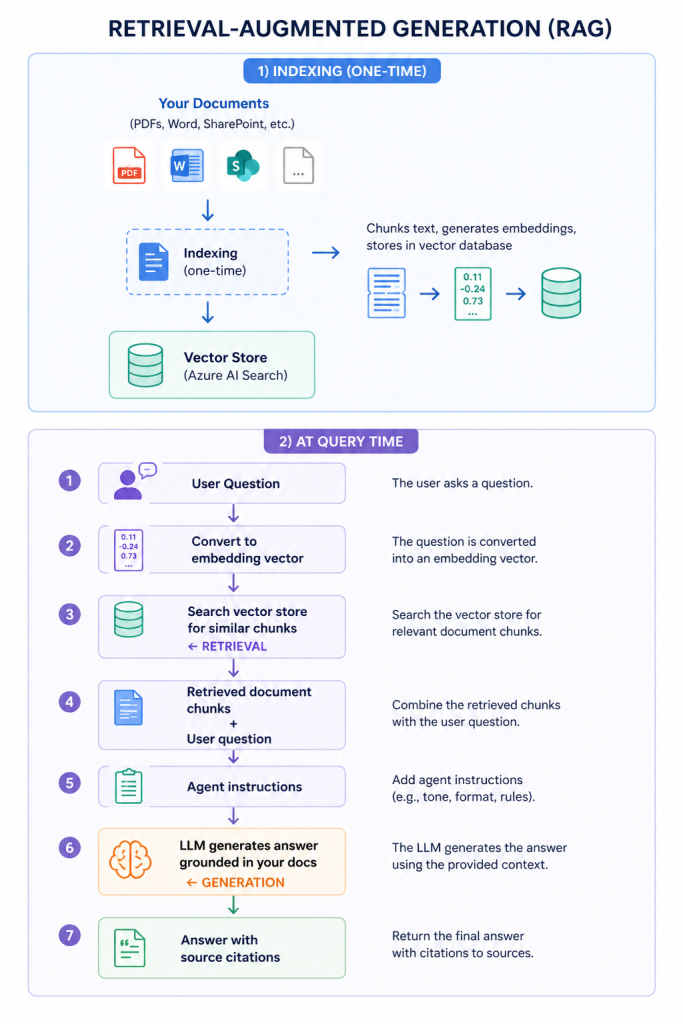
The agent isn’t guessing or hallucinating from training data. It’s reading your actual documents and synthesising an answer from what it finds.
Why This Matters for Enterprise
Let me give you a real scenario.
A client has a 400-page technical operations manual for their cloud infrastructure. When an incident occurs at 2am, the on-call engineer needs to find the right runbook quickly. Previously: they’d either know it by heart, spend 10 minutes searching, or call someone.
With a Foundry IQ-enabled agent:
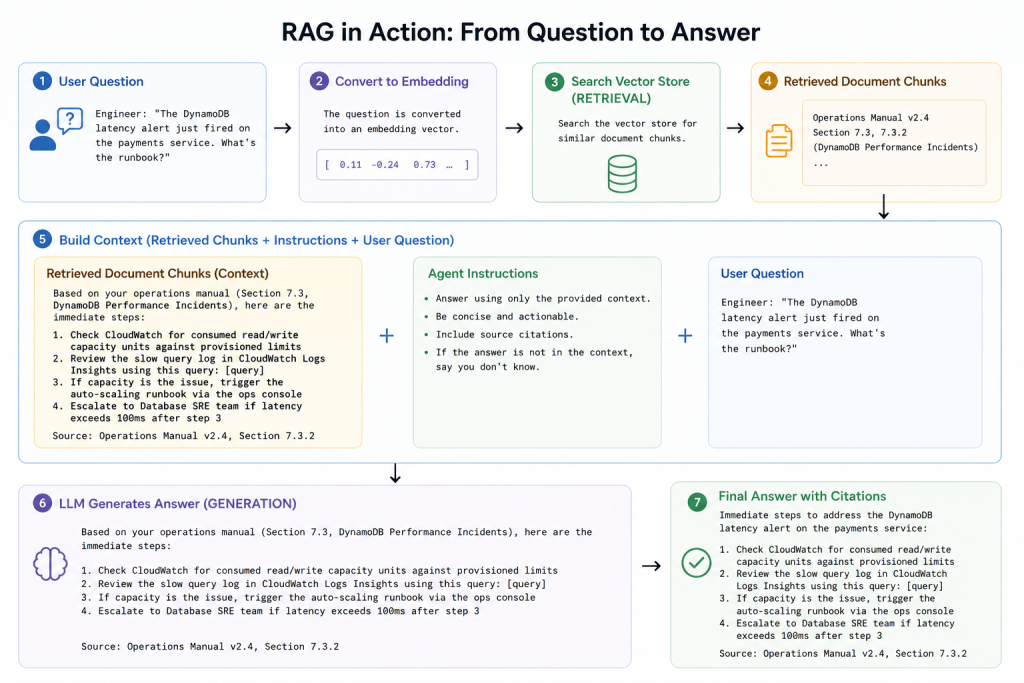
That’s not a generic answer. That’s an answer from their specific documentation, with a source citation so the engineer can verify it.
Setting Up Foundry IQ: The Components
The key components you configure:
- Document ingestion
Connect your document sources. Foundry supports Azure Blob Storage, SharePoint, OneDrive URLs, and direct file uploads. Documents get chunked into segments (typically 512-1024 tokens) with overlapping context to avoid losing meaning at chunk boundaries. - Embedding model
Chunks are converted to vector embeddings using an embedding model (typically text-embedding-ada-002 or text-embedding-3-large). This numerical representation captures semantic meaning so similar concepts find each other even when using different words. - Azure AI Search index
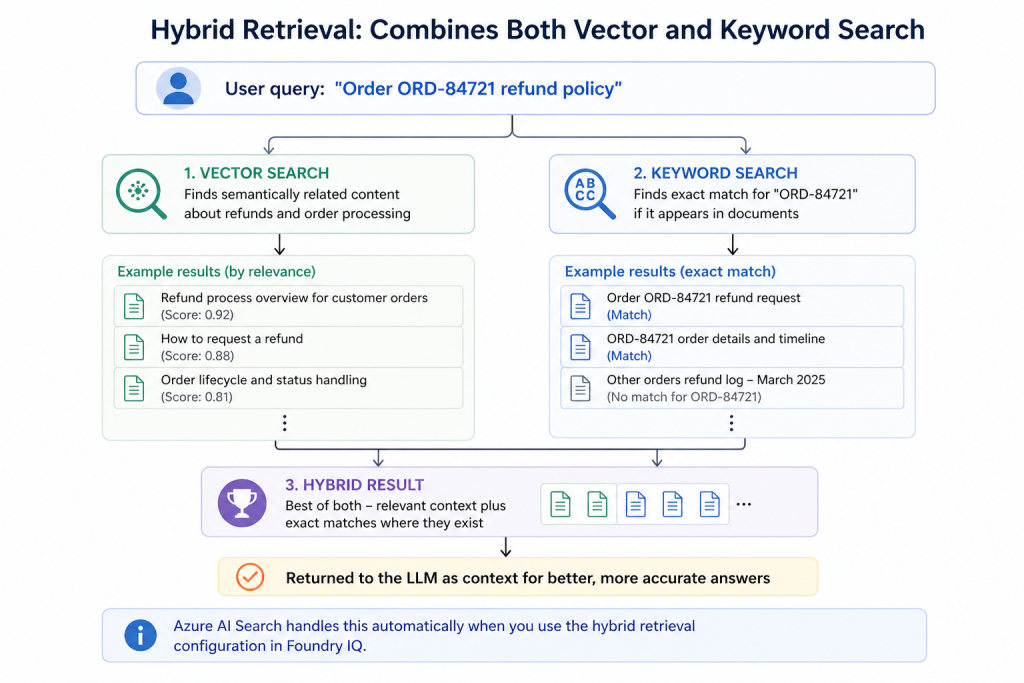
The embeddings and text chunks are stored in an Azure AI Search index. Foundry IQ uses hybrid retrieval – combining vector similarity search with traditional keyword search – for better accuracy than either approach alone. - File Search tool
When you attach the File Search tool to your agent, it can query this index at conversation time, retrieve relevant chunks, and use them to ground its response.
Hybrid Retrieval: Why It’s Better Than Pure Vector Search
This is a detail that trips people up. Pure vector search is great for semantic similarity – it’ll find a chunk about “database performance degradation” even if the user asked about “slow queries.” But it can miss exact matches for specific identifiers (order numbers, error codes, product SKUs).
Hybrid retrieval combines both
Chunking Strategy: The Detail That Determines Quality
The quality of your knowledge-enhanced agent depends enormously on how you chunk documents. This is where most RAG implementations underperform.
| Strategy | Best For | Risk |
| Fixed size (512 tokens) | Homogeneous documents | Splits concepts mid-thought |
| Paragraph-based | Well-structured prose | Variable chunk sizes |
| Section-based | Structured documents with headers | Large chunks may dilute relevance |
| Semantic chunking | Complex documents | Higher processing cost |
| Overlapping chunks | Preserving context at boundaries | Storage overhead |
My default recommendation for enterprise documents: paragraph-based chunking with 10-15% overlap at boundaries. This preserves semantic units (paragraphs are usually coherent thoughts) while preventing context loss at edges.
Keeping Knowledge Fresh: The Staleness Problem
One thing that doesn’t get discussed enough in RAG implementations: your documents change.
Policy updates, product versioning, regulatory changes, runbook revisions – if your index doesn’t reflect current documents, your agent confidently answers questions based on outdated information.
Mitigation strategies:
- Scheduled re-indexing – set up an automated pipeline to re-index your document sources on a schedule (weekly for stable content, daily for dynamic content)
- Event-driven indexing – trigger re-indexing when documents change (SharePoint can send webhooks, Blob Storage can trigger Azure Functions via Event Grid)
- Metadata filtering – tag documents with effective dates and filter retrieval to prefer recent versions
- Source citations – always show users which document was referenced so they can verify currency
Pros and Cons of Knowledge-Enhanced Agents
Pros:
- Agents answer from your actual documents – not hallucinated generalisations
- Source citations build user trust and enable verification
- Works across document formats (PDF, Word, PowerPoint, text)
- No need to retrain the LLM when your documents change – just re-index
- Dramatically reduces time spent searching for information
Cons:
- Index quality determines answer quality – garbage in, garbage out
- Chunking strategy significantly affects retrieval accuracy (and requires tuning)
- Azure AI Search SKU costs add up for large document repositories
- Doesn’t handle very large individual documents well (30 000+ pages)
- Can retrieve confidently incorrect information if documents contradict
A Word on Access Control
If your document repository has permission boundaries – not everyone should see everything – you need to respect those in your RAG pipeline. Azure AI Search supports document-level security through metadata filters.
The pattern: at query time, include the user’s group memberships as a filter. Only retrieve chunks from documents the user is authorised to see.
If you skip this and index everything into one index with no access control, your agent will confidently share information from documents users shouldn’t have access to. I’ve seen this happen in production. Don’t let it happen to you.
Next: I’ll walk through how to build agent-driven workflows in Foundry – the step up from single agents to orchestrated multi-step automation.