An LLM without tools is like a brilliant consultant locked in a room with no phone, no computer, and no access to any system. Smart? Yes. Useful in practice? Limited I would say…
Tools are what transform an AI agent from a very sophisticated chatbot into something that can actually do things in the world. In this article I’ll walk through what tools are, the difference between built-in and custom tools, how the agent decides which tool to use, and where this can go wrong.
What Is a Tool, Exactly?
In the context of AI agents, a tool is a callable function – something the agent can invoke to interact with the world beyond its training data and conversation context.
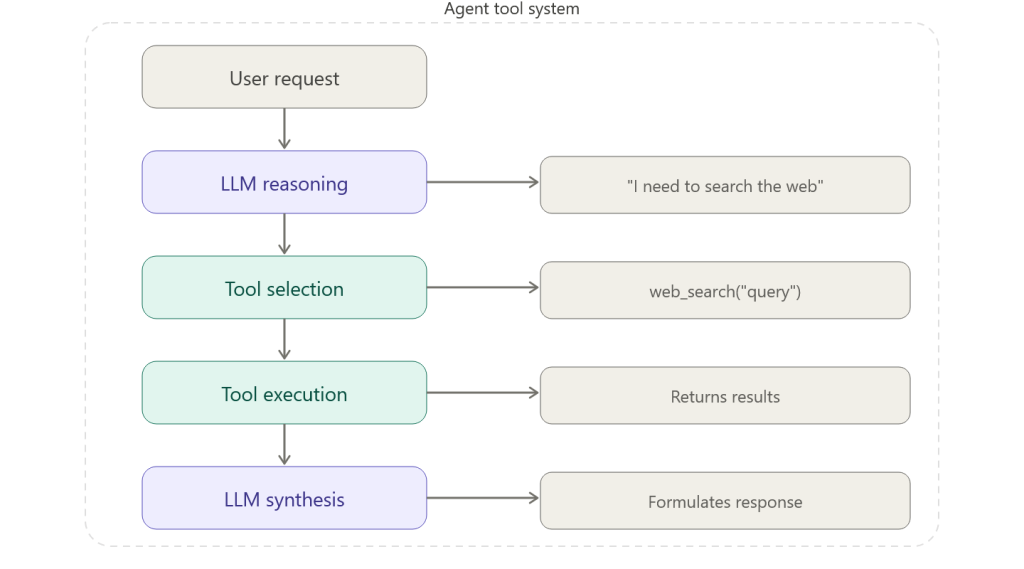
The critical point: the agent decides which tool to use, and when. You register the tools. The LLM figures out the orchestration. This is both the power and the risk of agentic systems.
Built-In Tools: Start Here
Azure AI Foundry Agent Service ships with three built-in tools that cover a significant portion of common use cases:
- Code Interpreter
Executes Python code in a sandboxed environment. Useful for:
- Mathematical calculations
- Data analysis and transformation
- Chart generation
- File format conversions
Real example: a user uploads a CSV of sales figures and asks “what was the month-over-month growth rate?” The agent writes Python to parse the CSV, calculate the rates, and return a formatted answer -without you writing a line of backend code.
- File Search
Searches through documents you’ve provided as knowledge sources. Useful for:
- Policy document lookup
- Product documentation Q&A
- Contract analysis
- Knowledge base search
This is powered by Azure AI Search under the hood. You upload documents, they get indexed, and the agent can retrieve relevant chunks to ground its answers. This is the Retrieval-Augmented Generation (RAG) pattern – but abstracted.
- Web Search
Retrieves live information from the internet. Useful for:
- Current events and news
- Pricing lookups
- Competitor monitoring
- Anything that changes faster than your data
| Tool | Best For | Latency | Cost Impact |
| Code Interpreter | Computation, analysis | Medium | Low-Medium |
| File Search | Document Q&A, knowledge retrieval | Low-Medium | Medium (Search SKU) |
| Web Search | Live/current information | Medium-High | Low-Medium |
Custom Function Tools: When Built-Ins Aren’t Enough
The real power comes when you connect your agent to your own systems. Custom function tools let you expose any capability as something the agent can call.
In the Microsoft Agent Framework (Python SDK), the pattern looks like this:
from azure.ai.agents import tool

@tool
def get_customer_account(customer_id: str) -> dict:
    """
    Retrieve customer account details from the CRM system.

    Args:
        customer_id: The unique customer identifier

    Returns:
        Dictionary containing account details and status
    """
    # Your actual CRM API call here
    response = crm_api.get_account(customer_id)
    return response.to_dict()
Three things that matter here:
- The @tool decorator tells the framework this function is available to the agent
- The docstring is critical – the LLM reads it to understand what the tool does and when to use it
- Type annotations help the LLM understand what inputs to provide
Once registered, the agent automatically discovers and invokes this function when it determines it’s the right tool for the job. No manual routing logic on your part.
How the Agent Picks the Right Tool
This is where I see the most confusion in training sessions. “How does the agent know to use File Search vs. Web Search?”
The answer: it reads your tool descriptions and reasons about which fits the current request.
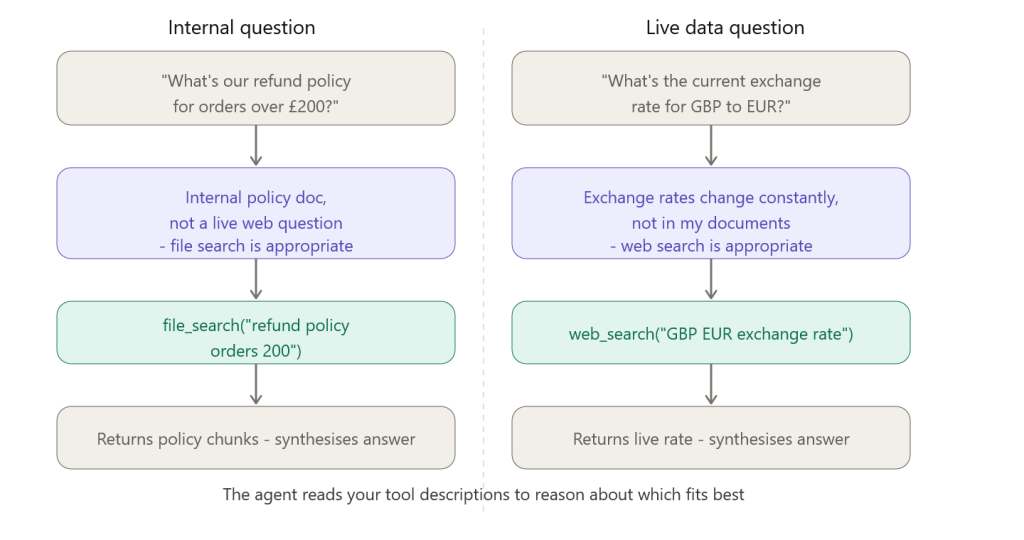
This is why your docstrings and tool names matter enormously. The LLM uses them as a mental map of available capabilities. A poorly named tool or a missing description leads to wrong tool selection – and wrong tool selection leads to wrong answers.
Connecting Tools to Azure Functions
For enterprise scenarios, you’ll typically implement custom tools as Azure Functions. This pattern gives you:
- Serverless execution – no infrastructure to manage
- Full access to Azure services and your internal systems
- Isolated execution environment with managed identity
- Easy integration with Key Vault for secrets
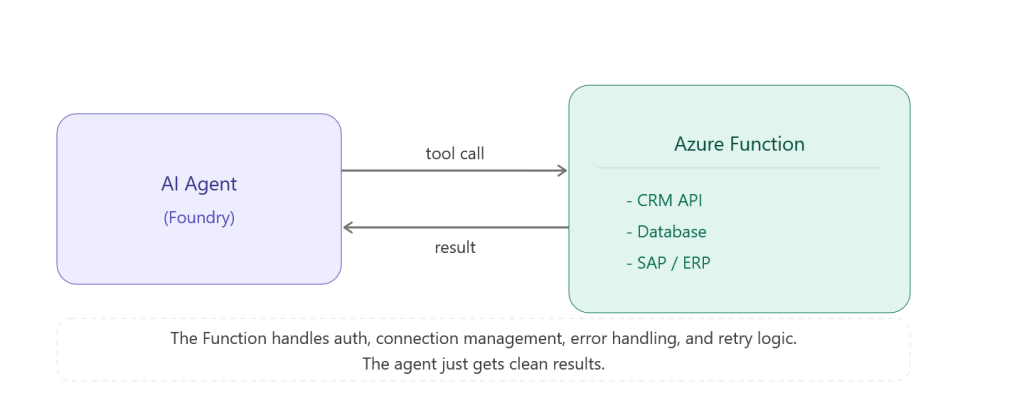
The Function handles authentication, connection management, error handling, and retry logic. The agent just gets clean results.
Security: The Part That Gets Skipped in Demos
Every tool is a potential attack surface. I’m going to say that again because it’s important.
Every tool is a potential attack surface.
When you give an agent a tool that can write to a database, you’ve created a code path where an LLM – which can be manipulated through prompt injection in user inputs – has write access to your database.
Mitigation strategies I implement on every production agent:
- Principle of least privilege – tools should only do exactly what’s needed. No admin access when read access is sufficient.
- Input validation in tool functions – don’t trust the LLM’s parameters blindly. Validate before you execute.
- Rate limiting – prevent runaway tool calls from burning through API quotas or triggering accidental bulk operations
- Audit logging – log every tool call with inputs and outputs. You need this for debugging and compliance.
- Human-in-the-loop for destructive operations – anything that deletes, overwrites, or sends externally should require confirmation
Pros and Cons of Giving Agents Tools
Pros:
- Dramatically expands what an agent can accomplish
- Custom tools integrate AI into existing business systems without rebuilding them
- Tool-based architecture is modular – add, remove, update tools independently
- The agent handles orchestration – you don’t write routing logic
Cons:
- More tools = more complexity = harder to reason about agent behaviour
- Tool descriptions need maintaining – outdated descriptions cause tool misuse
- Latency compounds – if an agent calls four tools sequentially, you feel each one
Security surface grows with each new tool - Debugging tool call chains requires good logging infrastructure
One of the most common mistakes I see in production: giving the agent too many tools.
There’s a cognitive load equivalent for LLMs. When you register 25 tools, the model has to reason about all 25 before selecting one. This increases latency, increases token consumption, and paradoxically reduces accuracy because the model has more ways to go wrong.
My rule of thumb: start with the minimum viable toolset. Three to five tools for most use cases. Add more only when you have evidence the agent needs them.
Next: I’ll cover how Foundry IQ (knowledge-enhanced agents) works – the deeper integration between your documents and your agent that goes beyond basic file search.
