The Foundry portal and its visual workflow builder are excellent tools. But there comes a point in every serious AI project where you need to step beyond the visual layer and write code. The Microsoft Agent Framework is where you go when that moment arrives.
It’s a Python SDK that gives you programmatic control over everything – agent creation, conversation management, tool integration, and multi-agent orchestration. If the Foundry portal is the configuration layer, the Agent Framework is the engineering layer.
Let me walk you through the core components and how they fit together.
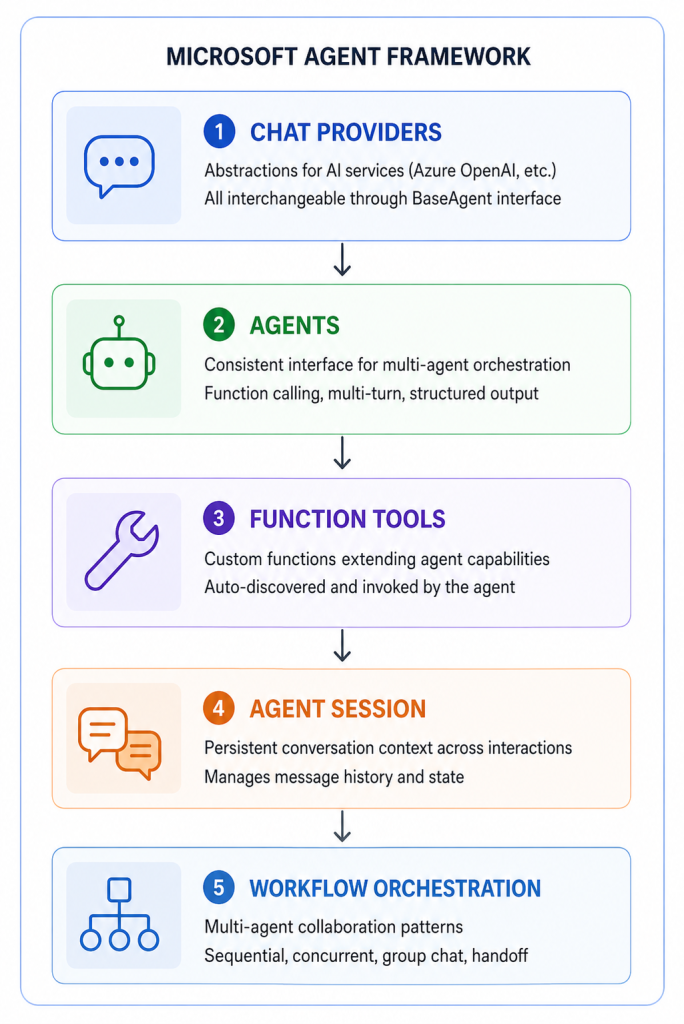
The Five Core Components
The framework is built around five well-defined abstractions. Understand these and the rest follows naturally.
Setting Up Your First Agent (Code Walkthrough)
Here’s the minimal setup to create a working agent with the framework:
from azure.ai.agents import AzureAIAgentClient, ChatAgent, AgentThread
from azure.identity import AzureCliCredential

# Step 1: Authenticate with Azure
credential = AzureCliCredential()

# Step 2: Connect to your Foundry project
client = AzureAIAgentClient(
    endpoint="https://your-project.openai.azure.com/",
    credential=credential
)

# Step 3: Define your agent
agent = ChatAgent(
    client=client,
    model="gpt-4.1",
    instructions="""You are a cloud cost optimisation advisor
    for enterprise Azure environments. Analyse resource usage
    patterns and recommend specific cost-saving actions with
    estimated monthly savings. Always quantify recommendations
    when possible.""",
    tools=[get_resource_costs, get_usage_metrics]  # custom tools
)

# Step 4: Create a conversation thread
thread = AgentThread()

# Step 5: Send a message and get a response
response = await agent.send_message(
    thread=thread,
    message="Analyse our storage account usage for the last 30 days"
)

print(response.content)
Five steps. That’s the full agent lifecycle – authentication, connection, configuration, thread creation, and conversation.
The AgentThread is what manages conversation state. Messages accumulate in the thread across turns, so the agent remembers the full context of the conversation. You create one thread per user session and pass it into every subsequent message.
Adding Custom Tools: The @tool Decorator Pattern
I covered the @tool decorator in the tools article, but let me show the complete pattern here in the context of the framework:
from azure.ai.agents import tool
import json

@tool
def get_azure_resource_costs(
    resource_group: str,
    time_period_days: int = 30
) -> dict:
    """
    Retrieve cost breakdown for an Azure resource group.

    Use this when the user asks about costs, spend, or billing
    for a specific resource group or environment.

    Args:
        resource_group: The Azure resource group name
        time_period_days: Number of days to analyse (default 30)

    Returns:
        Dictionary with cost by resource type and total
    """
    # Your Azure Cost Management API call
    costs = cost_management_client.query_costs(
        resource_group=resource_group,
        days=time_period_days
    )
    return costs.to_dict()

# Register with the agent
agent = ChatAgent(
    client=client,
    model="gpt-4.1",
    instructions="...",
    tools=[get_azure_resource_costs]  # Pass function reference
)
Critical things to get right:
- The docstring is the tool’s self-description. The LLM reads it. Write it clearly.
- Type annotations tell the framework what parameters to expect and validate
- Return type – return structured data (dicts, lists) not raw strings
- Error handling inside the function – the agent receives whatever you return, including errors
AgentThread: Understanding Conversation State
This is a concept worth spending time on because it’s different from how most developers think about API calls.
STATELESS API CALL (traditional):
Request 1: "What is X?" → Response 1
Request 2: "Tell me more" → ??? (no memory of Request 1)

AGENT THREAD (stateful):
Thread created
Message 1: "What is X?" → Response 1
Message 2: "Tell me more" → Response 2 (knows context from M1)
Message 3: "And in comparison to Y?" → Response 3 (knows M1 + M2)
The thread stores the full message history. Every subsequent message to the same thread includes all previous context. This is how multi-turn conversations work without you manually managing history.
For enterprise applications, the implications are:
- Each user session should have its own thread
- Threads have a token limit – very long conversations will eventually hit it
- Thread persistence (saving thread ID to database, resuming later) lets users continue conversations across sessions
- Thread data may contain sensitive information – apply appropriate access controls
Chat Providers: Swapping the Underlying Model
One of the framework’s design strengths is the BaseAgent abstraction. All chat providers implement the same interface, which means you can swap the underlying model without changing your agent logic.
# Using Azure OpenAI
from azure.ai.agents.providers import AzureOpenAIProvider

# Using another provider
from azure.ai.agents.providers import AzureAIInferenceProvider

# The agent interface is identical regardless
agent = ChatAgent(
    client=client,  # Different client, same ChatAgent
    model="claude-sonnet-4-6",  # Or any supported model
    instructions="...",
    tools=[...]
)
In practice, this means you can:
- Start development with one model and switch for cost/performance reasons
- A/B test different models against the same agent configuration
- Use different models for different agents in a multi-agent system (a cheaper model for simple routing, a more capable model for complex reasoning)
Built-In Tools in the Framework
Beyond custom tools, the framework exposes the same built-in capabilities as the Foundry portal:
from azure.ai.agents.tools import CodeInterpreterTool, FileSearchTool

agent = ChatAgent(
    client=client,
    model="gpt-4.1",
    instructions="...",
    tools=[
        CodeInterpreterTool(),      # Execute Python for analysis
        FileSearchTool(             # Search your document index
            vector_store_ids=["vs_abc123"]
        ),
        get_crm_data,               # Custom function tool
        send_slack_notification     # Another custom tool
    ]
)
Mix and match built-in and custom tools in the same agent. The framework handles the routing.
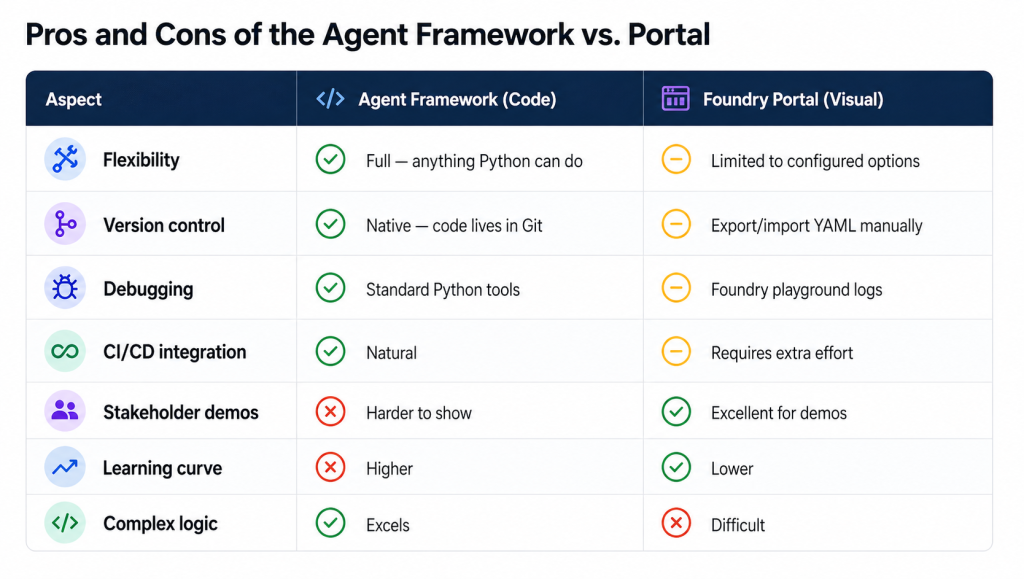
My recommendation: Use the portal for initial agent configuration and testing. Migrate to the framework when you need complex tool logic, multi-agent orchestration, or proper production deployment with version control.
What Makes the Framework Production-Ready
Beyond the core features, the framework includes:
- Streaming responses – stream tokens to the user as they’re generated rather than waiting for the full response
- Structured outputs – force the agent to return JSON matching a defined schema (essential for downstream processing)
- Retry logic – built-in exponential backoff for transient failures
- Telemetry hooks – emit custom metrics to your observability platform
- Async support – full async/await support for high-concurrency applications
These aren’t features you’ll need for a proof-of-concept. They’re features you’ll need before going to production.
Next: I’ll cover the five multi-agent orchestration patterns – concurrent, sequential, group chat, handoff, and Magentic – with real use cases for each.