A single well-configured AI agent is impressive. But most real business processes aren’t single tasks – they’re sequences of tasks, with decisions, branches, approvals, and handoffs in between. That’s where agent-driven workflows come in.
Think of workflows as the difference between hiring one very capable person and building a team with a clear process. The person is valuable. The team with a process is scalable.
What Is a Workflow in Foundry?
In Microsoft Foundry, a workflow is a declarative definition of a sequence of steps involving AI agents, conditions, and human interactions. Instead of writing imperative code to manage execution flow, you define what should happen and when using a visual, node-based approach.
The platform handles:
- Execution order and state management
- Passing outputs between steps
- Conditional branching
- Human-in-the-loop pauses
- Error handling and retry
You focus on the logic. Foundry manages the execution.
The Core Concepts: Nodes and Edges
Every Foundry workflow is a graph. The graph has nodes (the workers) and edges (the connections between them).
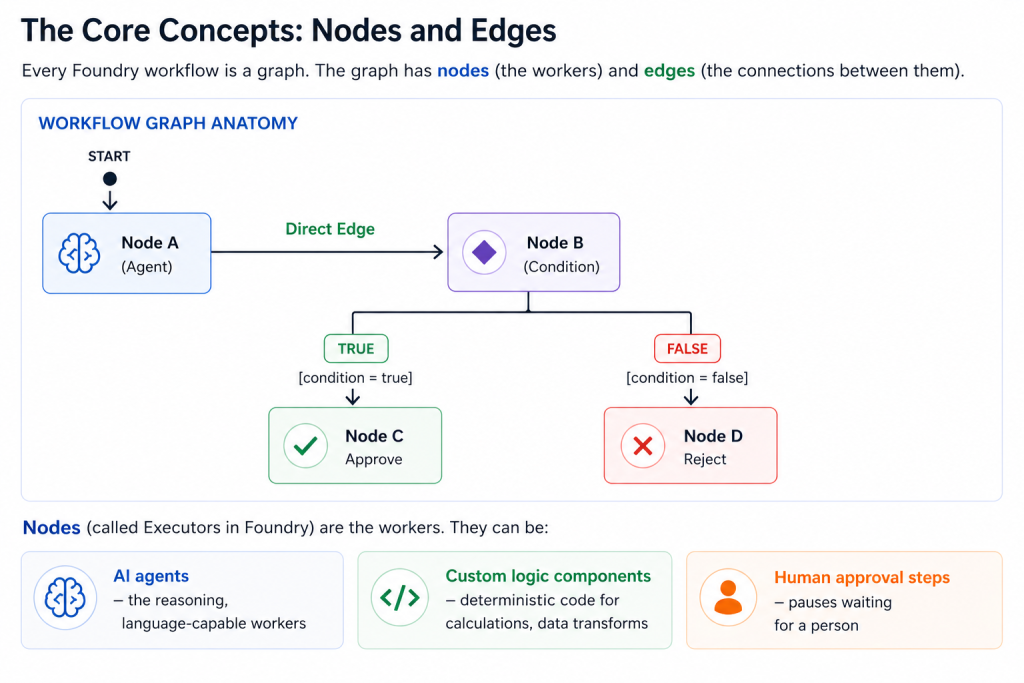
Nodes (called Executors in Foundry) are the workers. They can be:
- AI agents – the reasoning, language-capable workers
- Custom logic components – deterministic code for calculations, data transforms
- Human approval steps – pauses waiting for a person
Edges define how data and control flow between nodes. There are five types:
| Edge Type | Behaviour |
| Direct | Node A always feeds into Node B |
| Conditional | Node B only triggers if a condition is met |
| Switch-case | Routes to different nodes based on predefined conditions |
| Fan-out | Sends one message to multiple nodes simultaneously |
| Fan-in | Combines outputs from multiple nodes into one final step |
The Three Main Workflow Patterns
Pattern 1: Sequential Workflow
Steps execute in a fixed, ordered sequence. Each step’s output becomes the next step’s input.
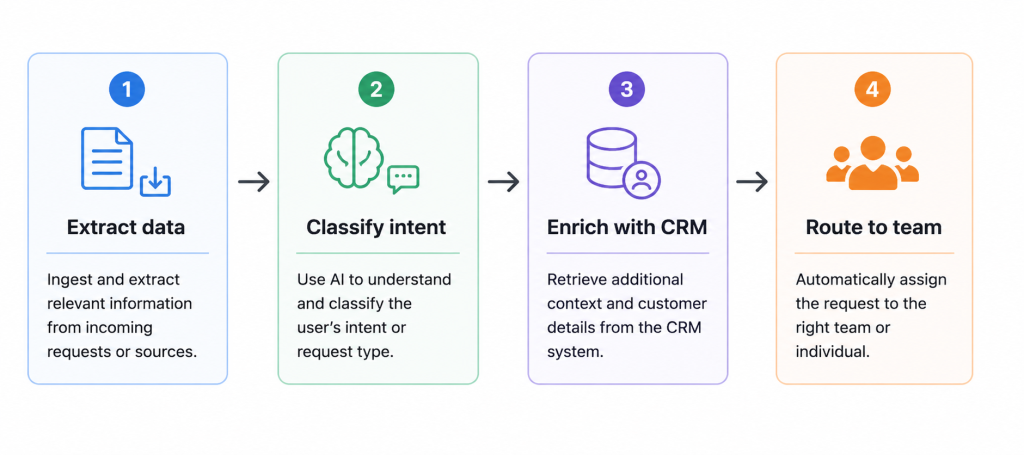
Best for: Predictable multi-stage pipelines where each step depends on the previous one.
Real example: Customer support triage. Extract the customer issue -> Classify as billing/technical/general -> Enrich with customer account history -> Route to the appropriate support queue.
Pros: Easy to reason about, predictable execution, straightforward debugging
Cons: One slow step blocks everything; not suited for parallel workloads
Pattern 2: Human-in-the-Loop Workflow
The workflow pauses at a defined point and waits for a human decision before continuing.
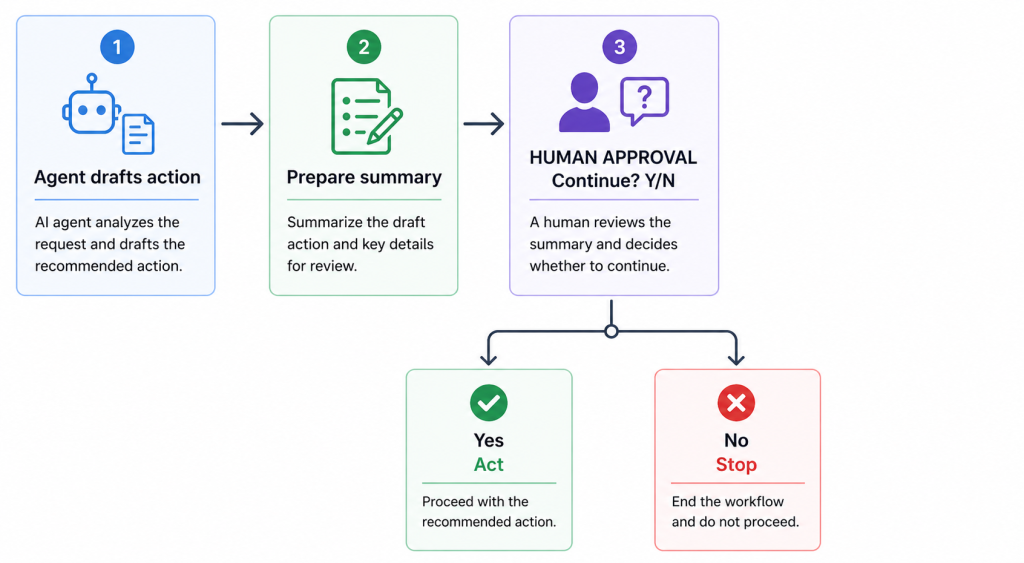
Best for: High-stakes or irreversible actions. Anything where you need a human to verify before committing.
Real example: Financial reconciliation agent. Agent identifies discrepancies, prepares a summary report, then pauses. A finance team member reviews and either approves the corrective journal entries or sends back for investigation.
Pros: Maintains human oversight for sensitive operations; builds trust in AI-assisted processes
Cons: Workflow speed is limited by human response time; requires clear notification and escalation design
Pattern 3: Group Chat (Collaborative) Workflow
Multiple specialised agents share a common conversation. Control shifts dynamically based on context.
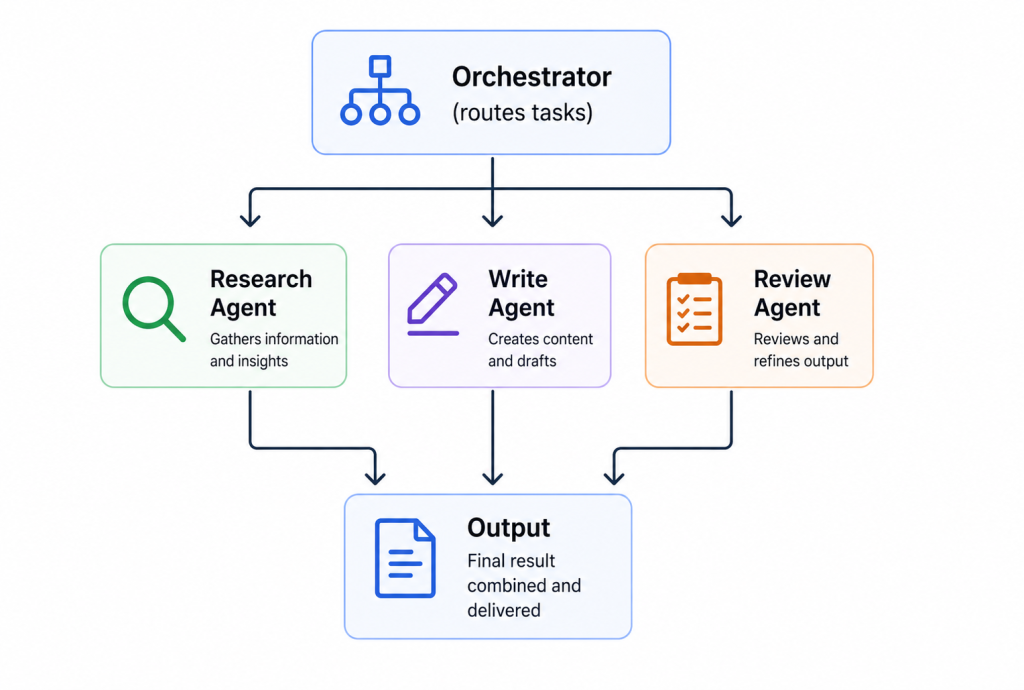
Best for: Tasks requiring different specialisations – where no single agent has all the expertise needed.
Real example: Report generation. Research agent gathers and summarises sources. Writing agent drafts the narrative. Review agent checks for factual consistency and flags gaps. Output is a collaborative product of all three.
Pros: Specialisation leads to better quality; agents can build on each other’s work
Cons: More complex to configure and debug; requires a well-designed orchestrator to avoid loops
Workflow Events: Understanding Execution State
One of the more technical aspects of Foundry workflows is the event system. Understanding what events fire and when is essential for debugging.
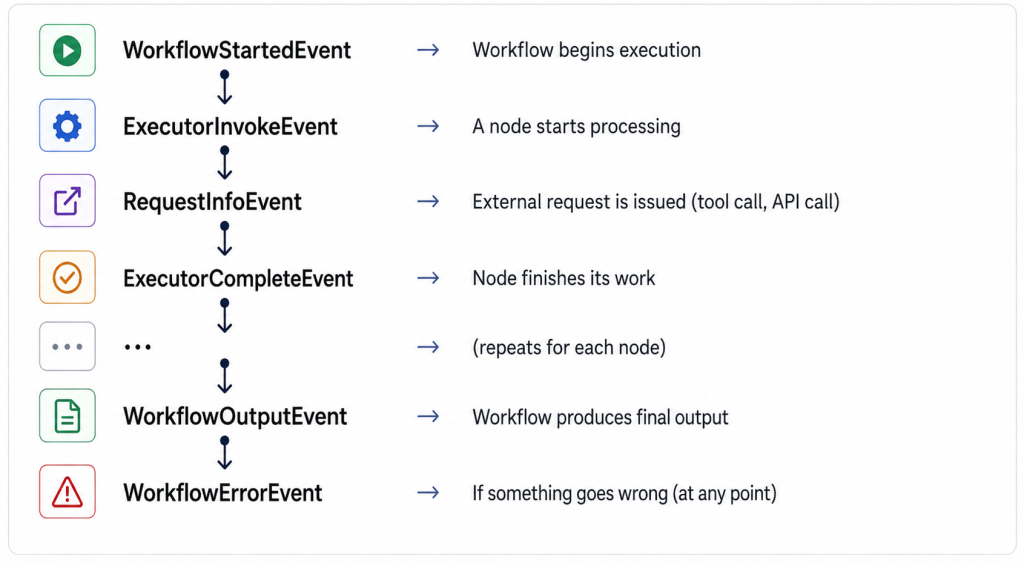
When a workflow behaves unexpectedly, start by examining the event log in sequence. The gap between events – or a missing event – tells you exactly where things broke down.
Designing for Failure
Every node in a workflow can fail. The questions to ask when designing:
- What happens if this node times out? Define timeouts per node and at the workflow level.
- What happens if an agent call returns an error? Retry? Skip? Notify a human? Abort?
- What happens if a tool call fails mid-workflow? Is the workflow idempotent? Can it safely retry from the beginning?
- What is the compensation strategy? If step 5 fails after steps 1-4 completed, do you need to undo those steps?
A workflow without failure design is a workflow that will behave unpredictably in production. Design the unhappy path first.
A Note on Monitoring Workflows
Foundry workflows emit telemetry you can capture in Azure Monitor and Application Insights. Set up:
- Workflow duration – alerting on unusually long runs
- Error rate – alerting on node failures
- Token consumption – tracking LLM costs per workflow execution
- Human approval lag – how long are human-in-the-loop steps actually taking?
That last one is often ignored. If human approval steps are taking 4 hours average when the SLA requires 1 hour, the bottleneck is human, not technical – and you need to know that.
Pros and Cons of Agent Workflows
Pros:
- Automate complex multi-step processes that previously required human coordination
- Visual, declarative approach is accessible to solution architects and business analysts
- Human-in-the-loop patterns provide oversight without sacrificing automation
- Nodes are modular – individual agents can be updated without rebuilding the workflow
Cons:
- Debugging distributed workflow execution is harder than debugging sequential code
- State management across nodes requires careful design
- Fan-out/fan-in patterns introduce complexity around output merging
- Human-in-the-loop workflows are only as fast as the humans in them
- Costs accumulate across every node – multi-agent workflows can be expensive
My Rule for When to Use a Workflow vs. a Single Agent
A single agent with good tools can handle a surprising amount of complexity. Before building a workflow, ask:
Can one well-configured agent with the right tools complete this end-to-end?
If yes – use a single agent. Simpler to configure, simpler to debug, lower cost.
If the process genuinely requires different specialisations, parallel execution, conditional branching based on business logic, or human approval gates – that’s when you reach for a workflow.
Don’t over-engineer. Start with the simplest thing that works.
Next: I’ll cover multi-agent orchestration patterns using the Microsoft Agent Framework – where the orchestration moves into code and you get much more fine-grained control.