Single agents are useful. Multi-agent systems are powerful. But “multiple agents working together” isn’t one thing – it’s five distinct architectural patterns, each suited to different problems. Using the wrong pattern is like choosing the wrong algorithm: you’ll get to an answer eventually, but inefficiently, and sometimes incorrectly.
In the Microsoft Agent Framework, all five patterns are supported. In this article, I’ll walk through each one with a diagram, a real use case, and an honest assessment (as usually 🙂 ) of where it works and where it breaks down.
Why Multi-Agent in the First Place?
Before choosing a pattern, let’s be clear on why you’d use multiple agents at all.
Specialisation: Different agents can be optimised for different tasks. A research agent has deep web access and summarisation instructions. A writing agent has strict editorial style guidelines. A review agent is configured to be critical and flag inconsistencies. Each is better at its role than a single general agent would be.
Parallelism: Some tasks can run simultaneously. Research on three different topics, analysis of five different documents – these don’t need to happen sequentially.
Cognitive load management: A single agent handling a very complex task with too many tools and too many competing instructions performs worse than a set of focused agents. Specialisation improves individual agent quality.
Oversight: Multi-agent patterns make it natural to insert checkpoints – human approvals, validation agents, quality gates – at appropriate points in a workflow.
Pattern 1: Sequential Orchestration
One agent after another. Each depends on the previous.
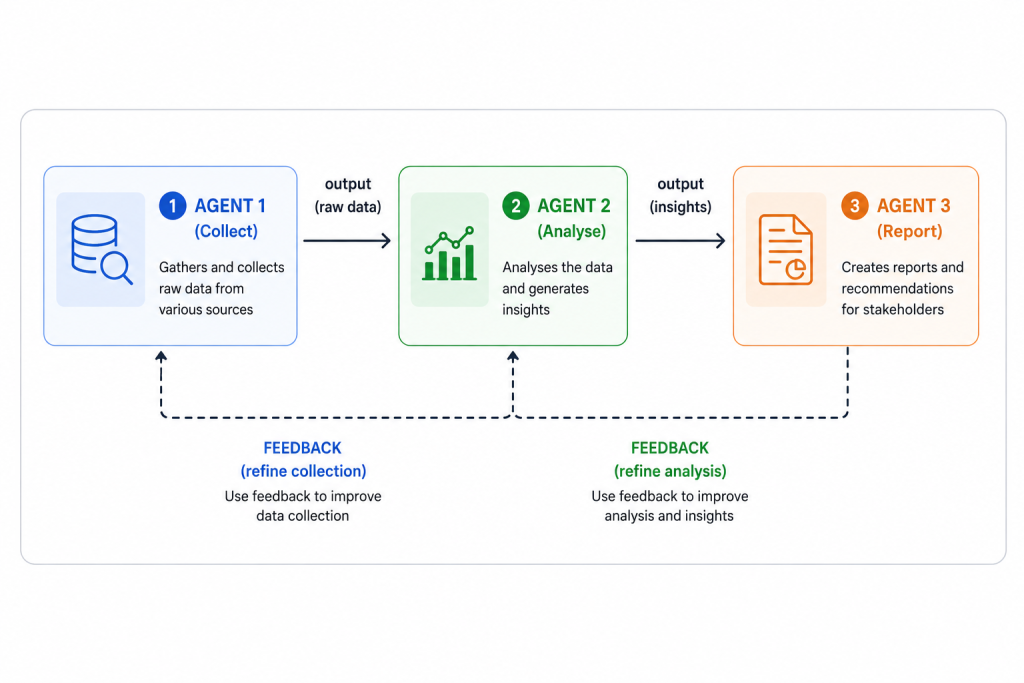
How it works: Agent 1 completes its task and passes output to Agent 2. Agent 2 completes and passes to Agent 3. Execution is linear and predictable.
Best for:
– Multi-stage content pipelines (research -> write -> review -> publish)
– ETL-like processes (extract -> transform -> load)
– Compliance workflows where order matters (collect evidence → assess risk → generate report)
Real example: Customer complaint handling
– Agent 1: Extract complaint details and classify category
– Agent 2: Look up customer account history and previous complaints
– Agent 3: Draft personalised response based on context and resolution policy
Pros: Easy to reason about, predictable output, straightforward debugging
Cons: One slow agent blocks everything; not suited for independent parallel work
Code pattern:
from azure.ai.agents import SequentialOrchestration

workflow = SequentialOrchestration(agents=[
    collector_agent,
    analyser_agent,
    reporter_agent
])
result = await workflow.run(initial_input="Customer complaint text here")
Pattern 2: Concurrent Orchestration
Multiple agents run simultaneously. Results merged at completion.
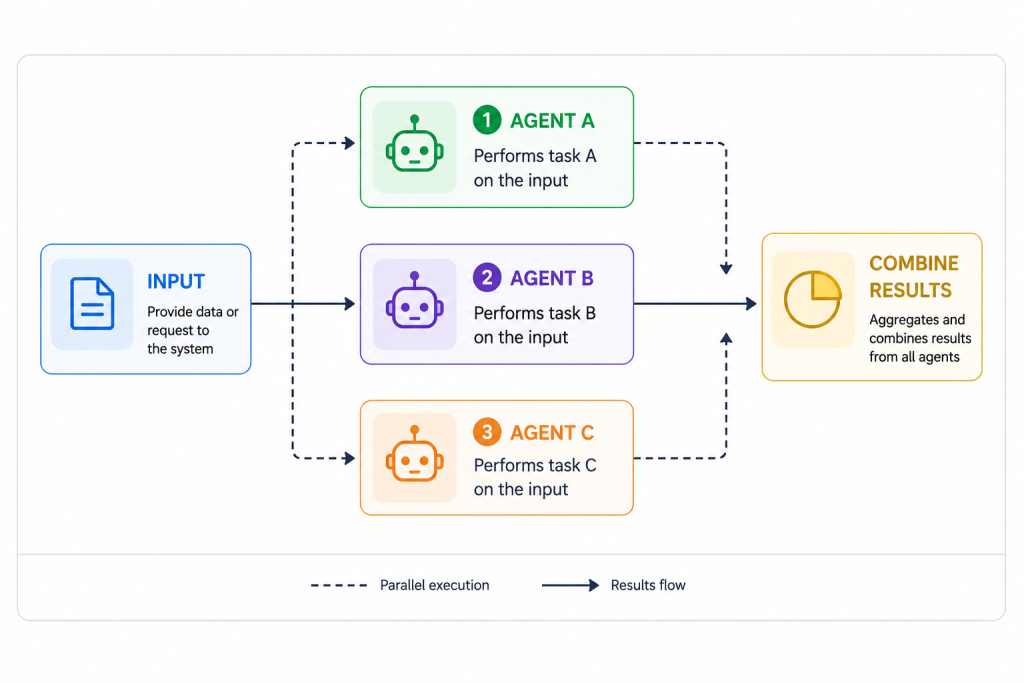
How it works: All agents receive input simultaneously and process in parallel. A merge step combines their results.
Best for:
– Independent analysis of the same data from different angles
– Research across multiple domains simultaneously
– Competitive analysis (evaluate option A, B, C in parallel)
Real example: Cloud architecture review
- Agent A: Security assessment of proposed architecture
- Agent B: Cost optimisation analysis
- Agent C: Well-Architected reliability review
- Merge: Consolidated findings report with all three perspectives
The same work that would take 3× longer sequentially completes in roughly 1× time (plus a small merge overhead).
Pros: Dramatically reduces total processing time for parallelisable tasks
Cons: Requires careful merge logic; all agents must complete before you get output; harder to debug individual failures
Pattern 3: Group Chat Orchestration
Agents share a conversation and hand control dynamically.
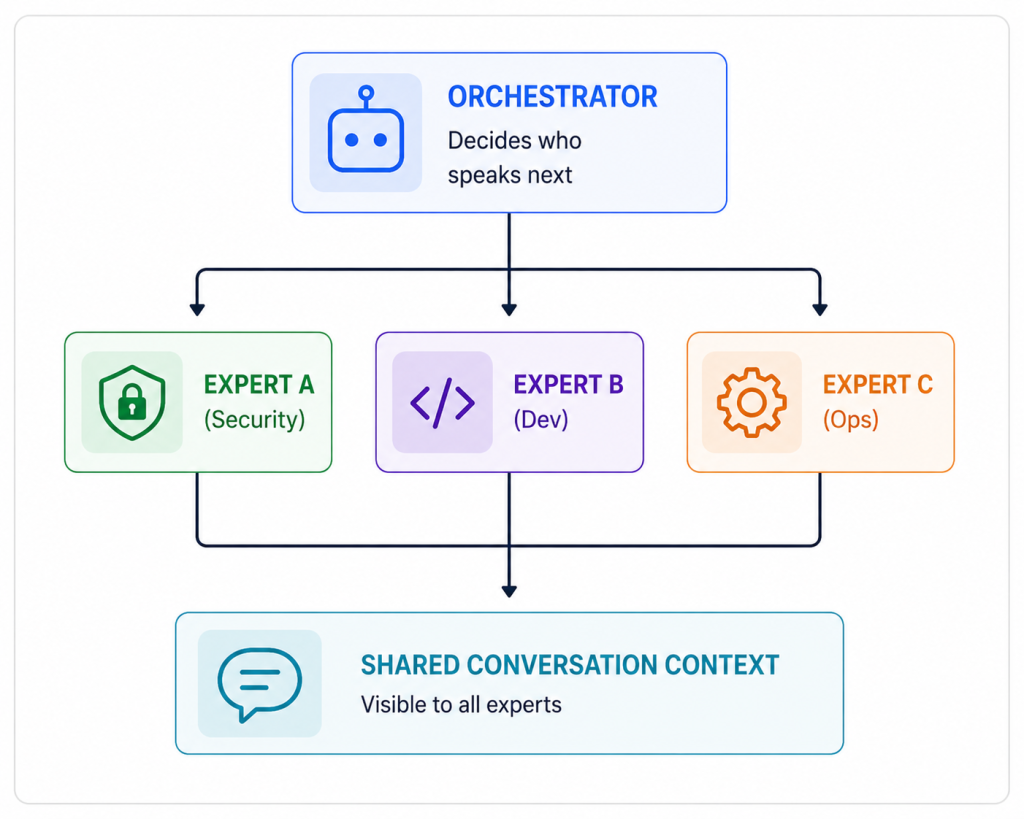
How it works: All agents share a common conversation thread. An orchestrator agent (or a defined selection function) decides which agent responds next based on the current context. Agents can build on, challenge, or extend each other’s contributions.
Best for:
– Brainstorming and creative problem solving
– Technical design reviews with multiple perspectives
– Strategy development requiring diverse expert input
Real example: Architecture decision record (ADR) development
- Security architect agent: Raises security implications of proposed design
- Platform engineer agent: Identifies operational complexity concerns
- Cost analyst agent: Estimates TCO impact
- Orchestrator: Guides conversation toward consensus and synthesises the final ADR
The conversation evolves organically, with agents reacting to each other’s inputs.
Pros: Rich collaborative output; agents can genuinely challenge each other; mimics expert panel dynamics
Cons: Most complex to configure correctly; can loop without proper termination conditions; harder to predict conversation path; most expensive in token terms
Pattern 4: Handoff Orchestration
One agent transfers control to another based on expertise.
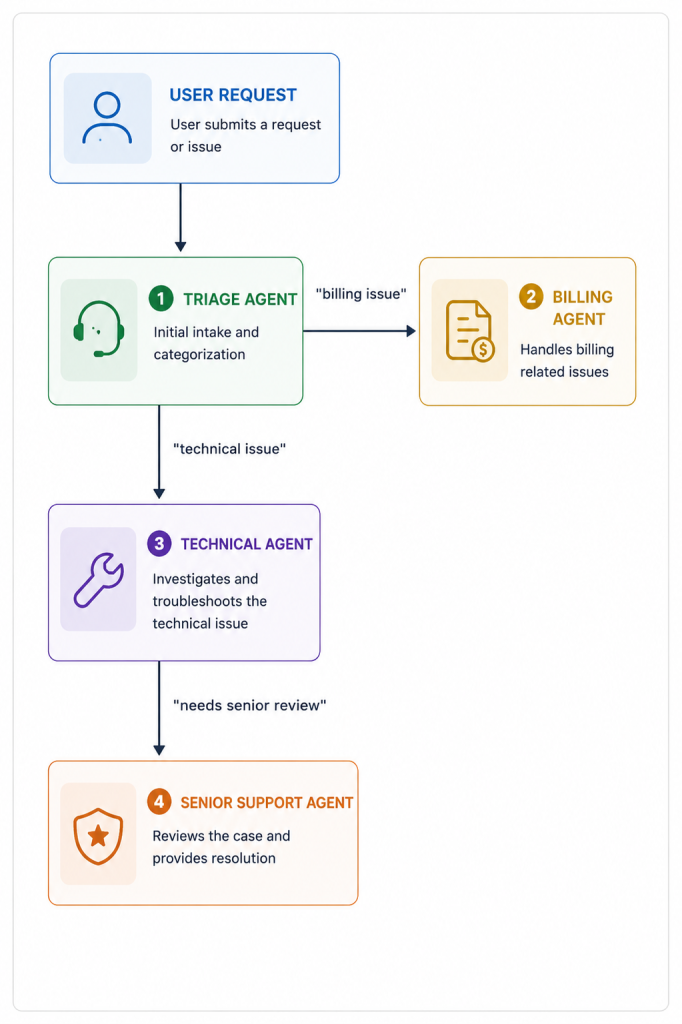
How it works: The receiving agent has clear ownership. Once handed off, the previous agent is no longer in the conversation. Each agent specialises in a specific domain and knows its boundaries – it handles what it can and hands off when it can’t.
Best for:
– Customer service workflows with different specialisations
– Escalation paths (tier 1 -> tier 2 -> specialist)
– Domain routing (HR queries -> HR agent, IT queries -> IT agent)
Real example: IT helpdesk
- First-line agent: Handles password resets, common issues, account unlocks
- Network agent: Receives handoff for connectivity issues
- Security agent: Receives handoff for access permission requests
- Senior analyst agent: Receives handoff when other agents can’t resolve
Pros: Clean ownership; each agent has a focused scope; natural escalation path; easy to trace which agent handled what
Cons: Requires careful handoff condition definition; risk of bouncing (A hands to B, B hands back to A); user experience can feel disjointed if handoffs aren’t smooth
Pattern 5: Magentic Orchestration
Adaptive, emergent collaboration with no fixed execution order.
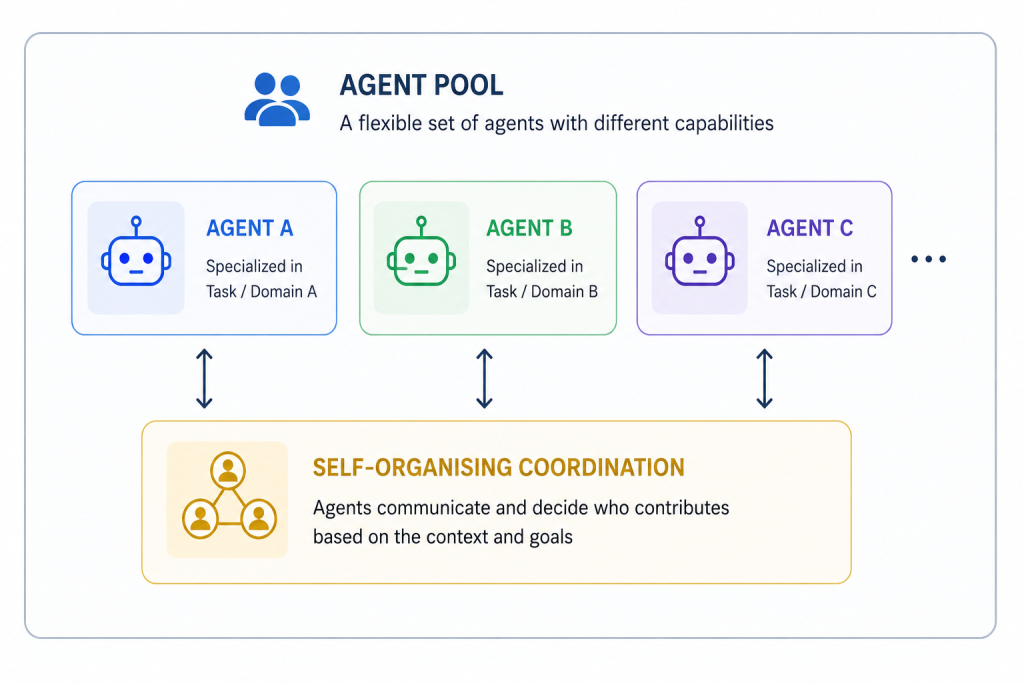
How it works: No fixed orchestrator. Agents self-organise based on the current state of the task. Any agent can contribute at any point. The system emerges to a solution through collective reasoning.
Best for:
– Complex, open-ended problems where the solution path isn’t known upfront
– Research tasks requiring exploration before convergence
– Creative generation with multiple contributing perspectives
– Scenarios where rigid sequencing would miss important insights
Real example: Strategic planning
- Market analyst agent contributes competitive intelligence
- Financial analyst agent contributes cost/revenue modelling
- Risk agent raises regulatory and operational concerns
- Innovation agent proposes differentiated approaches
- No fixed order – agents contribute when they have something relevant to add
Pros: Most flexible; can discover solution paths that predetermined patterns would miss; well-suited for genuinely complex problems
Cons: Least predictable; requires careful termination conditions; most difficult to debug; most expensive; not suitable for processes requiring auditability or fixed ordering
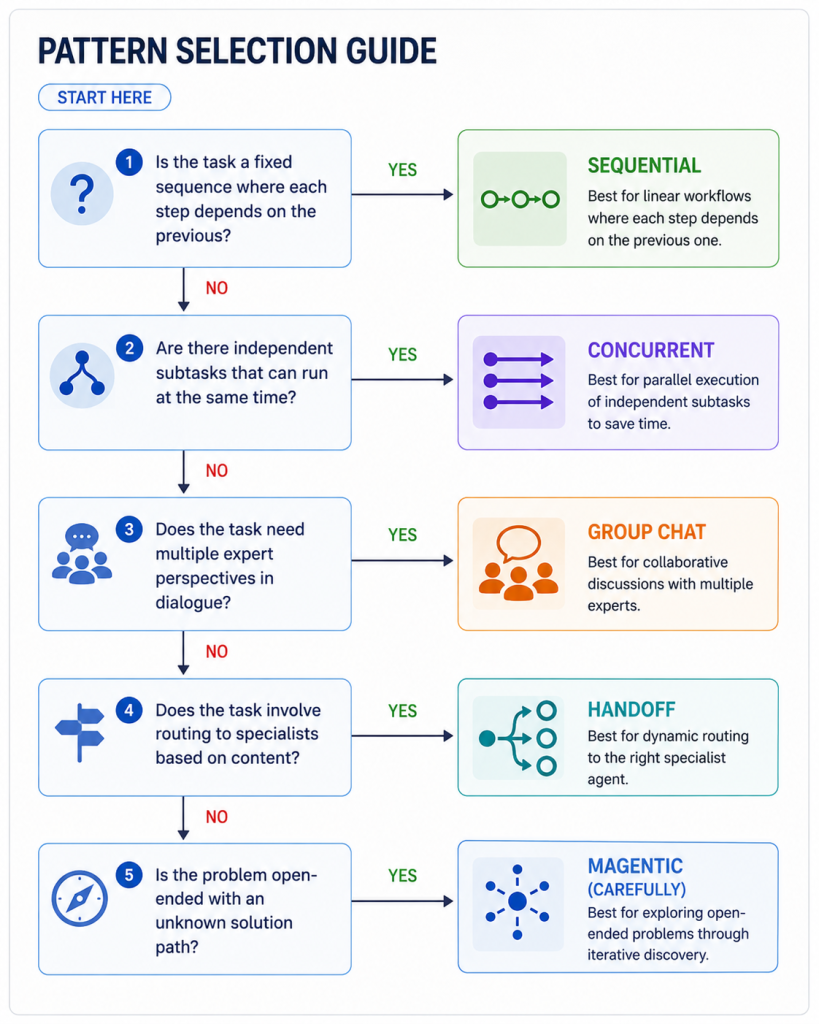
Pattern Selection Guide
Combining Patterns
Real enterprise workflows often combine patterns. A common architecture:
- Handoff routes the initial request to the right domain
- Concurrent runs independent analyses in that domain
- Sequential produces a final validated output from those analyses.
- Human-in-the-loop pauses for approval before action
Don’t feel constrained to one pattern. Design for the actual process.
Honest Cost Warning
Multi-agent systems multiply your token consumption. Every agent call costs tokens. Sequential four-agent workflows cost roughly 4× a single agent call. Concurrent systems multiply in parallel. Group chat can spiral.
Before deploying any multi-agent system to production, calculate your expected token consumption per workflow execution and set cost alerts accordingly. I’ve seen elegant multi-agent demos that cost $5-7 per execution – which is fine for a demo, catastrophic at scale.