Remember when every laptop manufacturer used a different charging cable? You needed a bag full of adapters just to work in a mixed-device environment. USB-C came along and changed that – one standard, works everywhere.
That’s the analogy I use when explaining Model Context Protocol (MCP) to technical teams. Before MCP, connecting an AI agent to external tools and services meant writing custom integration code for every single combination of model and service. MCP standardises that interface – and it’s changing how agents are built.
What Is MCP?
Model Context Protocol is an open standard (originally developed by Anthropic, now widely adopted) that defines a common way for AI models and agents to communicate with external tools, data sources, and services.
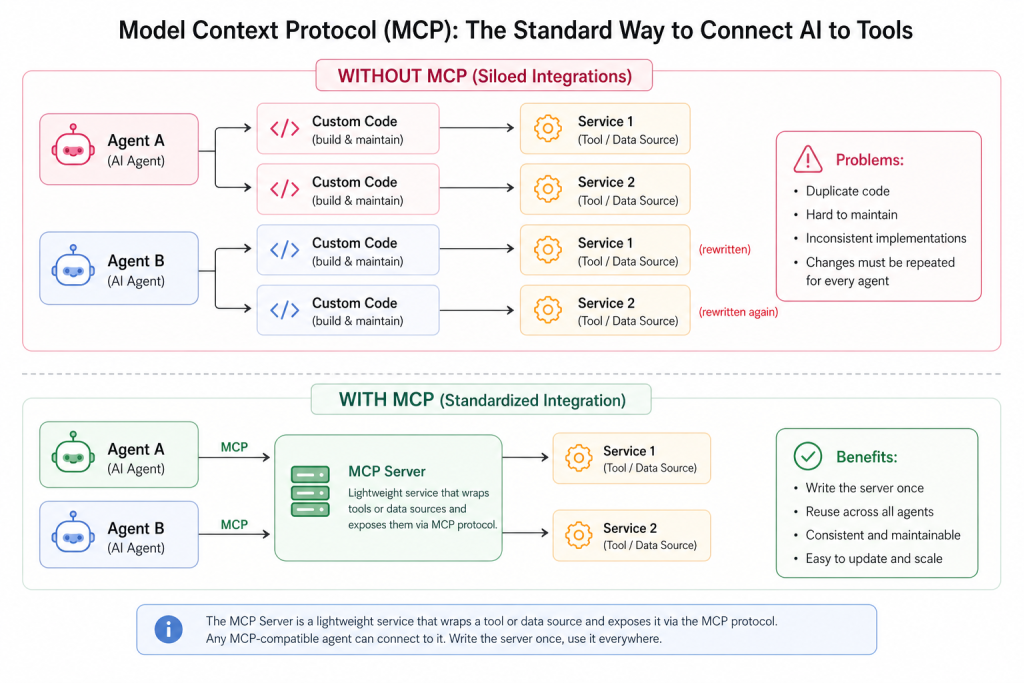
The MCP Server is a lightweight service that wraps a tool or data source and exposes it via the MCP protocol. Any MCP-compatible agent can connect to it. Write the server once, use it everywhere.
MCP in Azure AI Foundry
MCP integration is one of the key capabilities you configure when building agents on Azure. You can integrate MCP tools into your Azure AI agents directly through the Foundry Agent Service.
The setup flow looks like this:
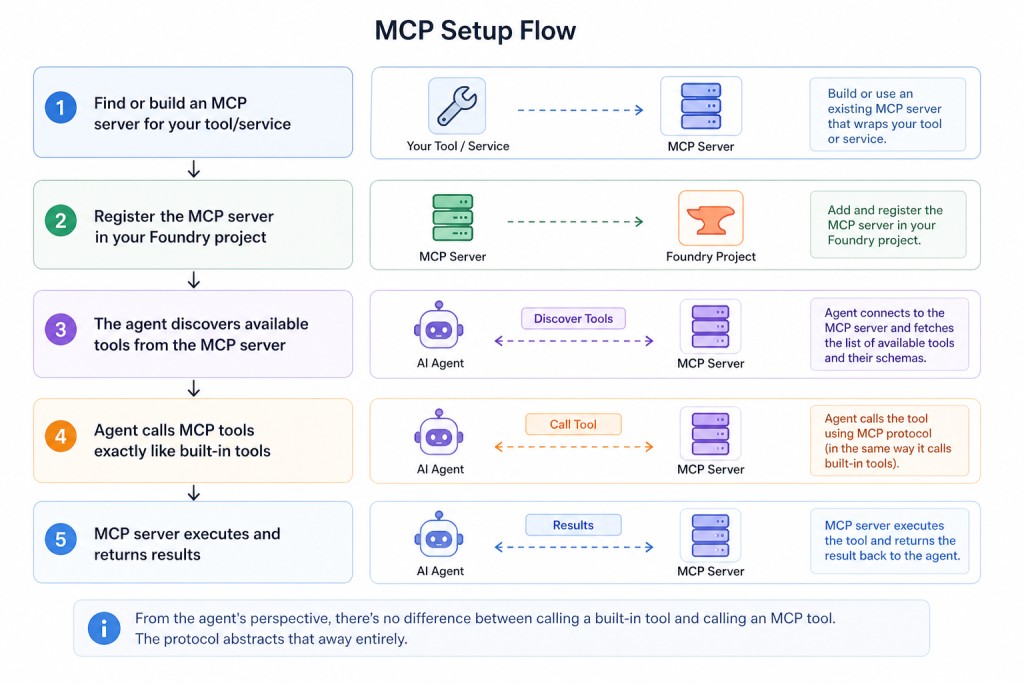
From the agent’s perspective, there’s no difference between calling a built-in tool and calling an MCP tool. The protocol abstracts that away entirely.
Real-World MCP Use Cases
Let me give you concrete examples of where MCP integration makes an enterprise agent dramatically more useful:
Microsoft 365 / Work IQ
Microsoft Work IQ is a CLI and MCP server that connects AI agents to Microsoft 365 data. Your agent can:
- Read calendar events and schedule meetings
- Access emails and draft responses
- Query Teams messages and channels
- Look up user profiles and org chart data
This is built on MCP – the agent connects to the Work IQ MCP server, which handles the Microsoft Graph API authentication and data retrieval.
GitHub Integration
An MCP server for GitHub exposes repository operations – reading issues, creating PRs, checking CI status. A code review agent connected to this MCP server can:
- Check what issues are assigned to a developer
- Review open PRs and their CI status
- Post comments on code
Database Access
An MCP server wrapping a read-only database view lets the agent query business data without you writing custom tool code. Define the MCP server once, attach it to any agent that needs data access.
The Architecture of an MCP Server
Understanding what an MCP server actually is helps you decide when to build one versus using built-in tools or custom functions.
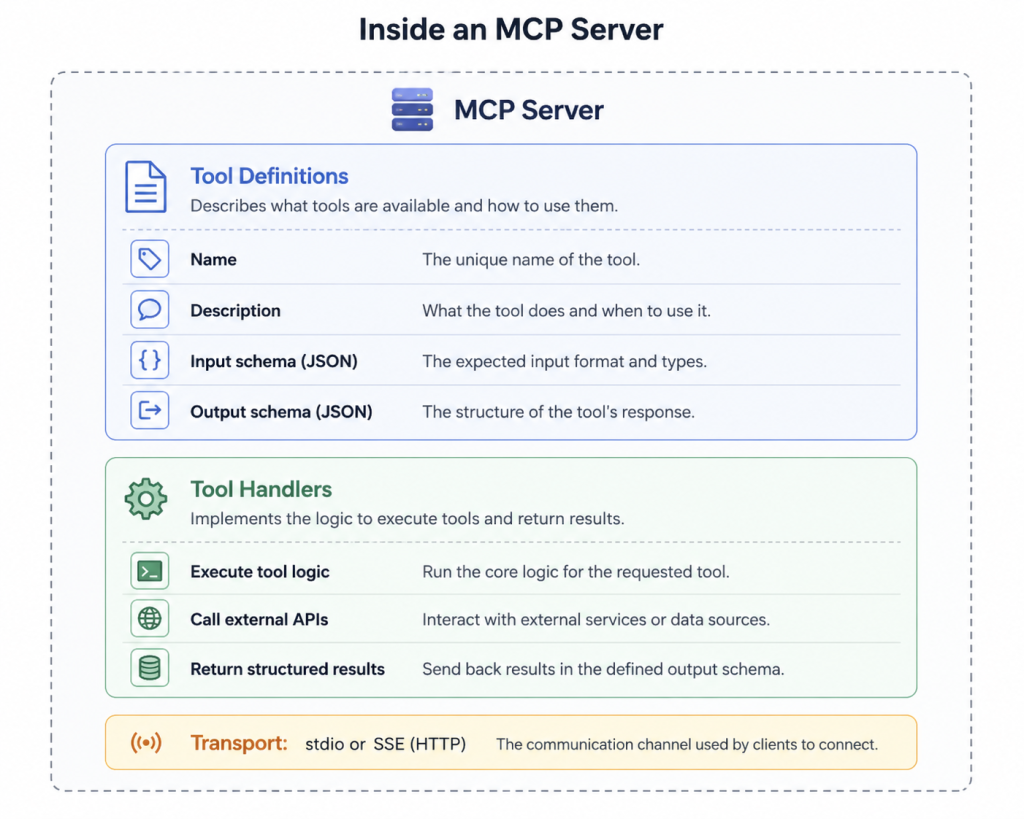
Two transport types:
- stdio – local process communication, best for desktop tools and development
- SSE (Server-Sent Events over HTTP) – remote server, best for cloud-deployed enterprise tools
For enterprise Azure deployments, SSE is the right choice. It means your MCP server can be hosted as an Azure Container App or Azure Functions, secured with Azure AD, and consumed by agents across your organisation.
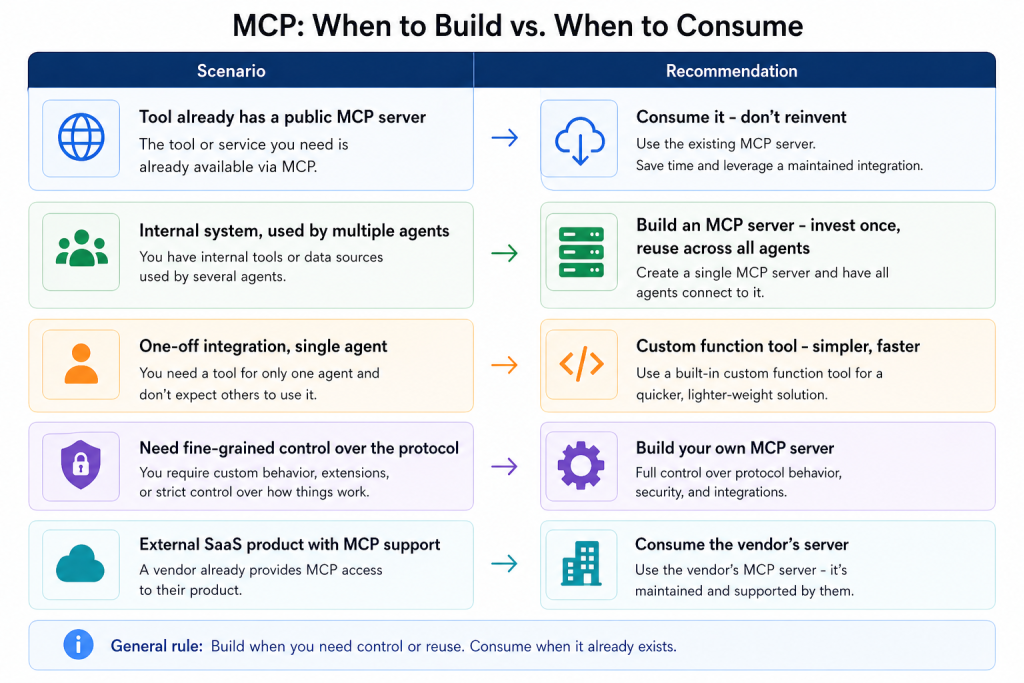
The ecosystem of available MCP servers is growing fast. Before building anything, check whether a server already exists for your target service.
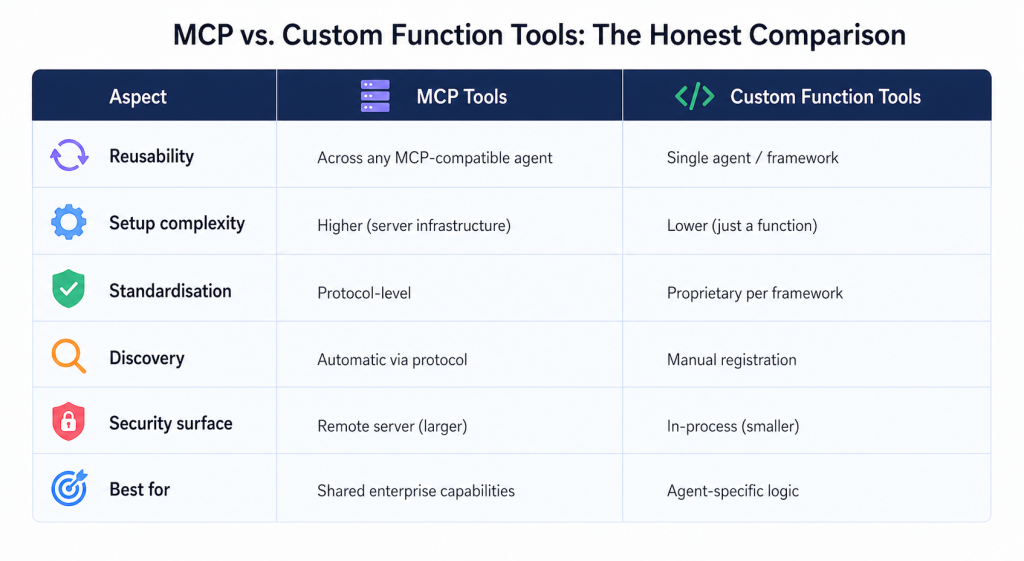
MCP vs. Custom Function Tools: The Honest Comparison
Pros and Cons of MCP
Pros:
- Write once, use across multiple agents and frameworks
- Growing ecosystem of pre-built servers (GitHub, Slack, Jira, databases, and many more)
- Standardised interface means easier governance and auditing
- Separates tool development from agent development – different teams can own each
- Framework-agnostic – works with Foundry, LangChain, Claude, etc.
Cons:
- Additional infrastructure to manage (MCP servers need hosting, scaling, monitoring)
- SSE-based servers add network latency to every tool call
- Authentication and secrets management across the MCP boundary needs careful design
- Still maturing – the specification has evolved quickly and some implementations lag
- Debugging across the agent -> MCP server -> external service chain is non-trivial
If you’re building enterprise agents today and expect to grow the agent ecosystem over time, invest in MCP infrastructure early. The upfront cost of building well-architected MCP servers pays back when you’re connecting your fifth agent to the same internal system instead of writing the same integration for the fifth time.
If you’re building a single-purpose agent for a specific use case – stick with custom function tools. Don’t over-engineer what doesn’t need to scale.
Next: I’ll cover Foundry IQ and knowledge-enhanced agents – the pattern that makes agents genuinely useful for document-heavy enterprise workflows.